
Recent News
Coming Soon: Turn Your DSD Data Into Answers with DSD AI Teammate
Almost any question you'll have about your operation this week already has an answer sitting in DSD Manager. How yesterday's sales broke down by route. Which accounts have slipped past due. Whether a driver ran his stops out of sequence on Tuesday—that's in there too.
The trouble is getting to it. Usually you have to know which report holds the answer and pull it with the right filters. Then you export it so you can sort through it in Excel. Or you ask the person on your team who knows where everything lives, and you wait until they have a free minute.
Most DSD operations have learned to live with that gap between having the data and having the answer. We've been working on a way to close it, and it's coming soon!
You're Data-Rich, but Answer-Poor
It's 6 a.m. and the trucks are loading. Two drivers came back well past close yesterday, and your ops manager wants to know which routes ran long before she signs off on today's plan. Was it a one-off, or is something off in how those routes are built?
The answer is already in the system. Every stop from yesterday is there with a timestamp. But first she has to remember which report shows route times and set the date range. Then she works through forty routes by hand. By the time she has an answer, the trucks she was trying to plan for have already pulled out.
Or picture an owner looking over the month. Sales at one chain feel soft, and he wants to know if it's a handful of stores or the whole account. The data can answer that. But the question doesn't match any report he already runs, so it goes on a list for someone to look into when they get a chance. Often that chance doesn't come until next month.
That's the real cost of being data-rich and answer-poor. When the answer takes too long to reach, you end up deciding without it. Some calls get made on gut feel because the numbers aren't ready in time. Others wait for the numbers, and by the time they arrive, the moment has passed.
None of this is a knock on your team. Most reports were built to answer the questions someone expected when they designed them. The questions that come up at 6 a.m. rarely fit that mold.
Meet DSD AI Teammate: Just Ask
DSD AI Teammate is a new AI layer built right into DSD Manager. It enhances the reporting you already have through Business Analytics and adds something reports have never done on their own: it takes your question the way you'd actually say it.
At the center is the AI Assistant. You type a question in plain English, and it returns an answer from your live DSD data. There's no report to hunt for and no filters to set. You might ask:
- "Show me yesterday's sales by route."
- "Which customers have overdue invoices?"
- "What are my top 10 products by sales this month?"
- "Rank routes by drops per day, year to date."
If it's easier to talk than type, you can speak your question. And if a report or an error message has you stumped, you can paste in a screenshot and ask the Assistant what it means.

What an Answer Looks Like
Say you run dairy routes and want to know which item is leading at each chain. You ask, and Teammate starts with a short plain-English summary. It might tell you, for example, that Cool Cow Milk Gallon is your top seller at CVS. Below the summary is a chart, and below that is a sortable table with the full breakdown, which you can export to Excel in one click.
The summary is what makes it different. A static report hands you rows of numbers and leaves the reading to you. Teammate reads the result first and tells you what stands out, so you start from the insight instead of digging for it.
The same idea carries over to the dashboards you already use. Click "Explain this view" on a dashboard like Company Overview, and Teammate sums up what the numbers are saying. It points out which chains and categories are moving, suggests a few next steps, and offers follow-up questions you can run with a single click.
.avif)
That's the step beyond Business Analytics as you know it. BA shows you the data. Teammate reads the results for you, finds the trends worth your attention, and recommends where to act.
More Than a Chat Box
The Assistant is the headline, but DSD AI Teammate brings a few more tools with it.
Dashboards & Reporting. Build dashboards around the numbers you check most, and rearrange them as your priorities shift. When it's time to share, send a dashboard by email or save it as a PDF. Every dashboard has the same "Explain this view" button, so you get the plain-English read there too.
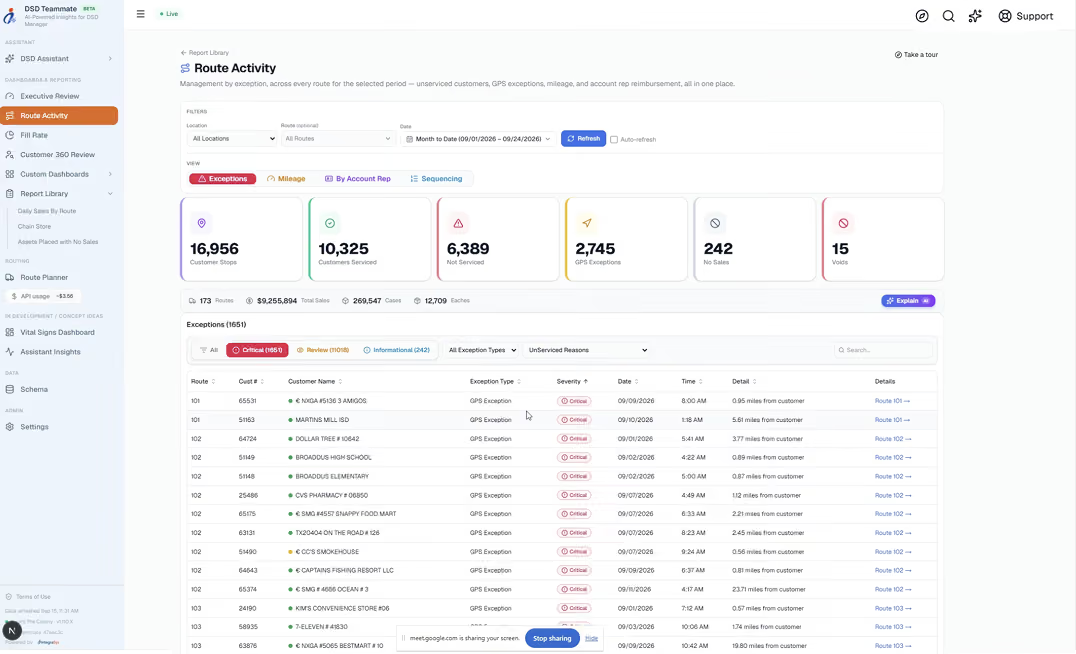
Route Activity. This view is built for managing by exception. You don't have to comb through every route. The problems come to the top first: customers who weren't serviced, and GPS exceptions where a stop was recorded away from the customer's location. You can also check mileage by route. A Sequencing view shows where stops were run out of order. Remember the out-of-sequence stop from the start of this post? This is where it shows up.
Customer 360. Everything about an account comes together in one place, so you can see how it's trending and where there's room to grow. That helps before a sales call or a conversation about service levels, when you want the full picture of an account without pulling three reports to get it.
What It Looks Like Across Your Team
Everyone on your team asks different questions, and Teammate meets each of them where they are.
For an owner, it's a quick read on the business. You don't have to wait for the month-end numbers to see how a chain is trending. You can ask the moment the question comes to mind.
For an ops manager, it's catching a problem while it's still small. An unserviced account or a GPS exception gets flagged in Route Activity, instead of coming to light when the customer calls.
For a route manager, it's checking performance without waiting on IT or on the one person who knows the reports. The question gets answered in about the time it takes to type it.
None of this replaces the people who know your routes and customers best. It makes good people faster, so they spend their time acting on the data instead of chasing it.
The Answers Were There All Along
That’s what DSD AI Teammate is being built for—the moments when you need to understand what happened, see what deserves attention, and decide what to do next. By bringing faster, clearer answers to the people closest to the operation, Teammate will help your team spend less time searching for information and more time putting it to work.
DSD AI Teammate is coming very soon, built right into DSD Manager. Watch your inbox for the official announcement, which will include details on how to join the beta!
Streamline Your DSD



.avif)
All Rights Reserved.